
Video Rental Software with Point-of-Sale
© 2001-2010 Software-Clinic. All rights reserved.
|
Navigation buttons:
|
|
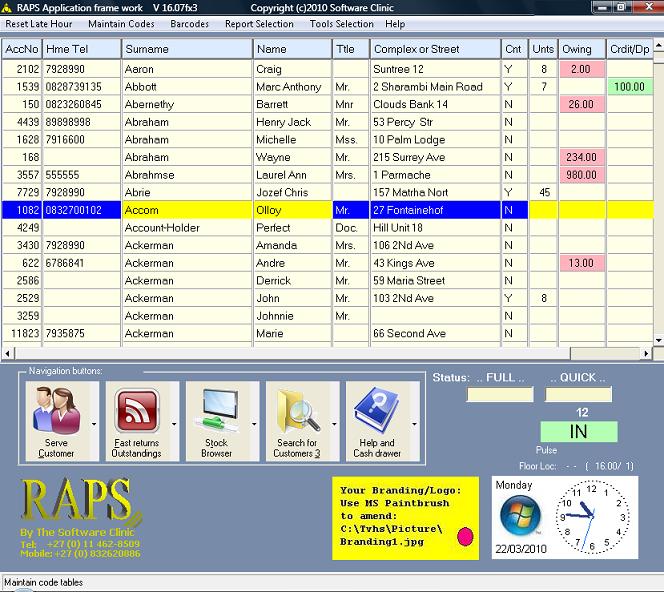
Some Screen shots: Customer browser with drop-down menus and easy operational buttons: This is the main working window where operators can serve customers by just pressing the enter key on the customer to be served to start the transacting process. Customers records can also be created or maintained through this window. A cash customer can also be created for casual retail transactions. RAPS is very keyboard friendly e.g. by depressing the ‘A’ key the operator can enter a customers accounting transaction history or by depressing the ‘M’ key the operator can enter a memo for the customer being highlighted…there are other keys that can be depressed to perform other powerful customer functions. Also notice that there is a menu bar at the top of the window that can be dropped down for report selections and other powerful and friendly functions. At the bottom of the browser are the normal daily operational buttons used by the operator to serve and help a customer. Note that functions can be configured to be password protected and that there is extensive help through-out RAPS. |
Note:
Color-coding
is used to indicate that a customer is in debt or has credits
due to them. I.e. green is used to indicate that a credit is
due. Rose color is used to indicate if a customer has an
outstanding balance, if the surname in the customer browser is
highlighted in a rose color then this indicates that the
customer is blacklisted by the store. Color is used to guide
the operator with customer interaction. Searching for a
customer can be achieved by entering the: last-name/surname,
account number, first-name, ID number or work/Cell/mobile
telephone number… refer to the Search for customer by grouping
buttons. The Browser will then position itself
and highlight
the customer that satisfies the search criteria or the
closes fit.
Note:
The
STATUS QUICK entry will give the price and floor location of
where to find a stock item when a stock number is scanned or
entered. If a customer asks for a product by a key word e.g.
something with the word ‘planet’ then just depress
the letter ‘T’ to get into the catalogue window
followed by the letter ‘W’ to get into the keyword
search function where ‘Planet’ is typed in then all the
stock with the word ‘Planet’ will appear. Words or phrases
can be used within this function.
Note:
The stores logo can also be displayed on this main window
promoting the store to both management and staff.
Note:
For a quick start and understanding of transacting
with a list of fundamental reports to run a business;
then click on the help button found on the customer browser
above. Note you must have downloaded and installed RAPS to do
this.
The
operator satisfied with the client being highlighted can then
press the enter key to start the rental and retail transacting
process that follows:
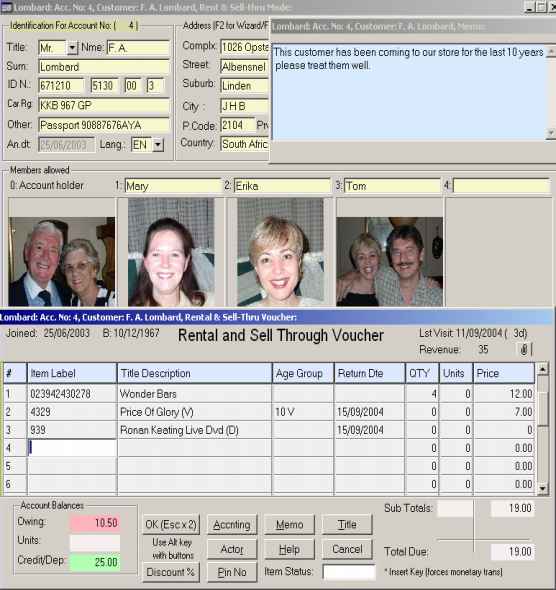
Customer Rental & Retail Transactions: Note: Picture resolution lost due to window example being resized. |
Note:
The above example is composed of several related windows all
free floating on main customer account window allowing the
operator to pull into view important information when
required. Also notice the various buttons
that allow the operator to interact with the customer while in
the rental and retail process e.g. a customer can ask about
the availability of a movie for the weekend and the operator
can help by depressing the Title button and then even book the
movie for the customer… and then carry on selling and
renting. The operator is also free to click on the customer
address details and change them while in this process. The
rental and retail process has been designed to allow the
operator to be very interactive with a customer. In fact many
customers can be opened up at the same time and be served as
their whims change.
Note:
Barcode scanning of
retail/sell-thru items is also supported.
Note:
RAPS can be configured to show and calculate the General Sales
Tax for countries using the GST tax system e.g. USA.
Note:
Expanding the return date of rental items will mark-up the
daily price by the number of days a rental item is taken. Not
true for special club memberships that have already been
preconfigured with the number of keep days.
Note:
The above transaction entry window is sensitive to the type of
stock items being entered and applies the necessary rules
required for processing without operator intervention. I.e.
retail, rentals and club membership sales.
Catalogue Browser:
The
following catalogue browser allows operators and
management to maintain five different types of stock items
that can be sold or rented through the above rental and
sell-thru voucher window:
1.
Rental
2.
Retail
3.
Points/Units club membership configurations
4.
VIP club membership configurations e.g. rent 2 and then rent
two more once the first two are returned without attracting
late fees. A monthly fee is charged for this type of club
membership allowing the customer to rent/hire as they wish
without being frustrated on when rentals should be returned.
These VIP memberships can also be configured to have tighter
controls if required. There are also customer reports for the
various types of VIP memberships that help management post the
monthly debit orders required to control this type of club
membership. Also these club memberships can be configured to
expire on x number of days or even put a limit as to the
number of days that rentals can be kept before attracting late
fees making these club memberships/contract very flexible.
5. Specials can be configured for retail stock e.g. by two items of group ‘A’ and get a group ‘B’ item for a 50% discount. Or be specific with stock numbers that are on special. |
Note:
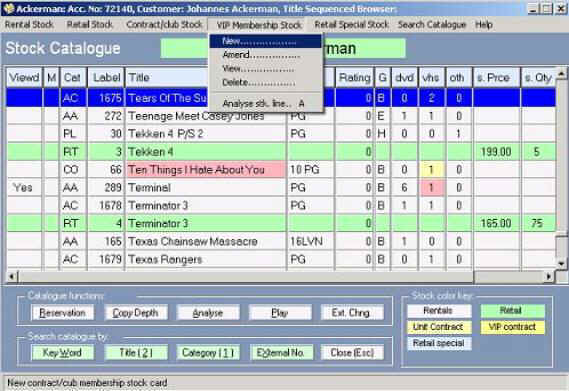
Color
coding is used to indicate that rental items are available or
not. I.e. the color amber is used to indicate that a rental
item is due back for current date. The rose color is used to
indicate that there are no copies available for the title or
for the specific format for the current date. Also notice that
a light green highlights retail/sell-thru stock and take
notice of the selling price and quantity in stock indicators
on the same line. The catalogue browser is very powerful, in
that it allows management and staff to get meaningful
information on rental, retail, contract and special stock items from one Window. Remember each rental item can be
associated to a floor location where reports can be extracted
in this order for easy stock taking. Also serial numbers and
Pictures per copy of rental items can be recorded.
Hourly
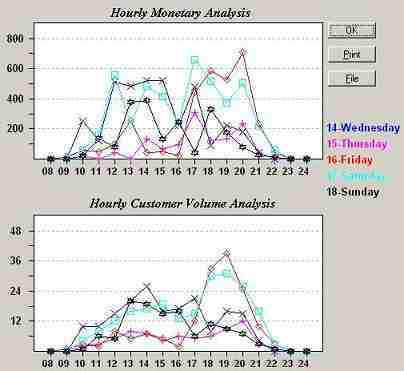
Movement Analysis for 1 to 7 days: |
Note:
The
above function allows for the planning of staff requirements
during heavy business periods.
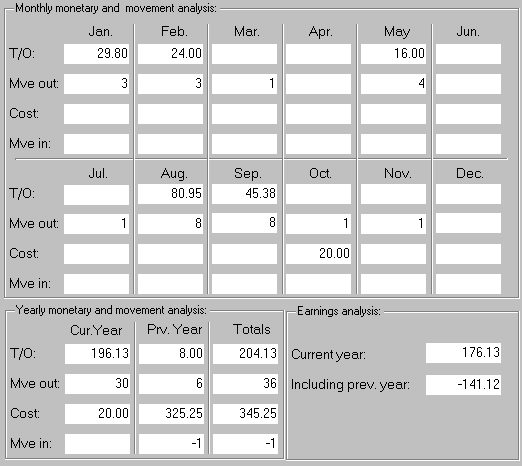
Twelve
Month Revolving Financials For A Catalogue Item: depressing
the letter ‘A’ on the catalogue browser while highlighting
the stock item to be analysed triggers this analysis. |
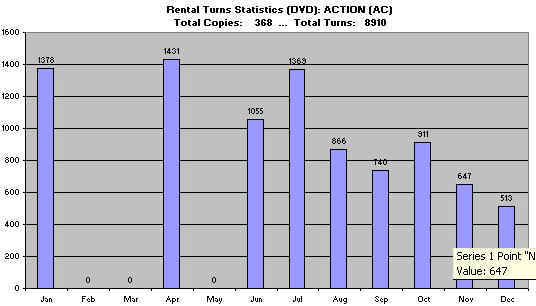
| Category Analysis For Action…Could be DR (Drill rentals during year): |
| Play Multi-Media From The RAPS Catalogue (MPG, DAT, AVI, MP3, WAV): |

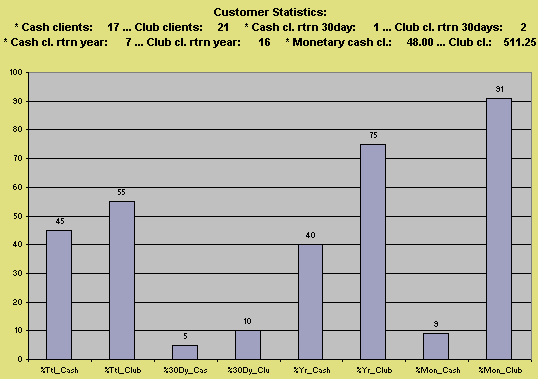
| Customer Statistics: |
|
Notes: on customer graphical report representation:
|
|
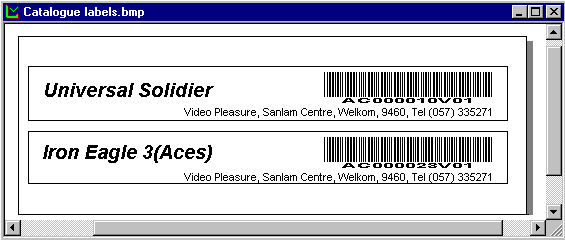
Note: Barcodes can also be produced for customer club memberships... reducing fraud. The printing within a barcode label can be rearranged and resized. The RAPS system is designed to be flexible. |